Perfect tickets, every time.
You get better tickets, not more of them.
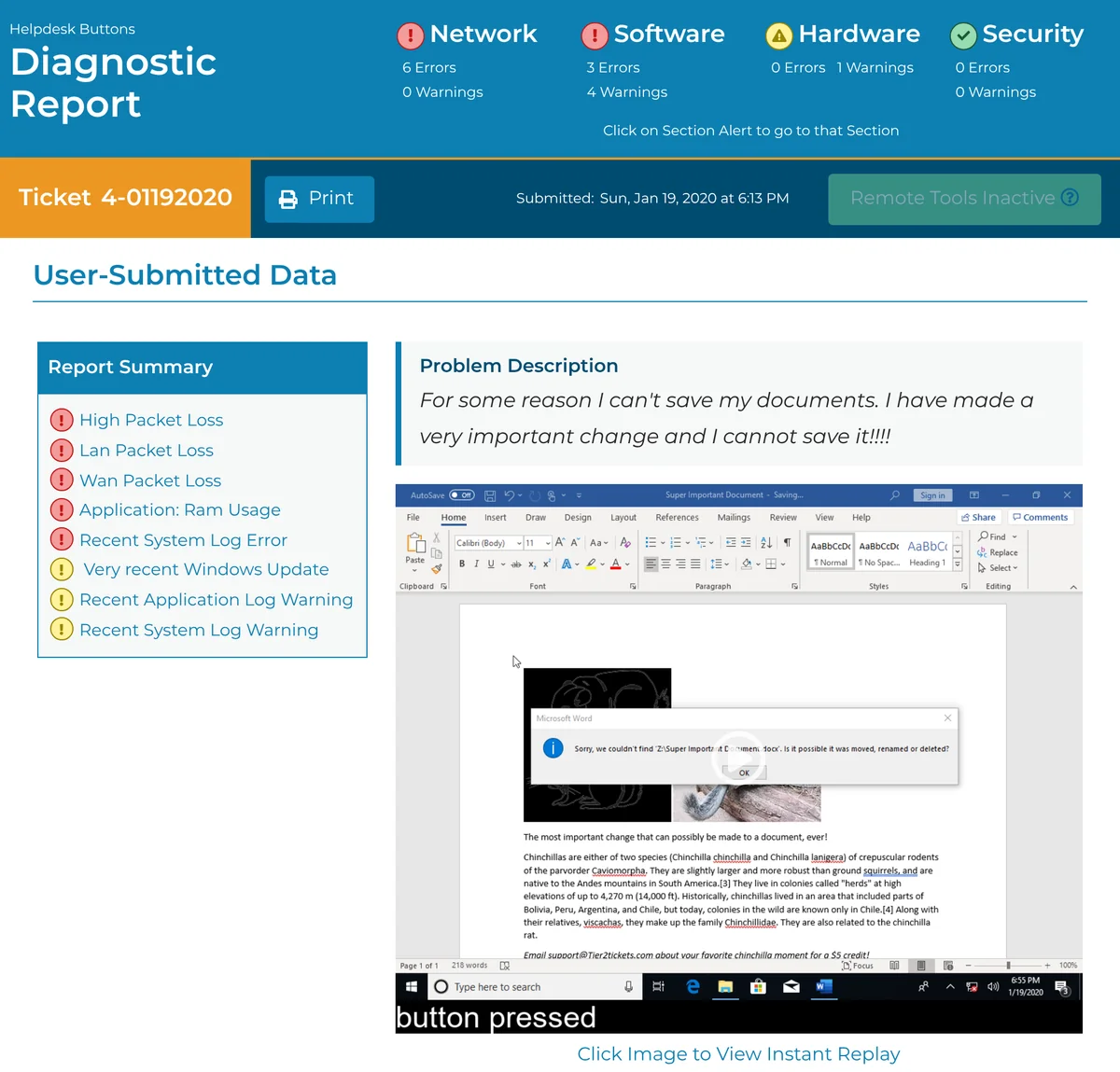
Tier2Tickets attaches the diagnostics your techs would have run to each ticket a user sends, before it reaches your PSA. You can book a short Zoom demo with us, try it yourself, or watch a recorded walkthrough.
If you’re not ready for a call, you can see the other ways to look at it.
Book a Zoom demo with us.
We’ll give you a 10–15 minute Zoom demo of a real ticket from start to finish, and we’ll answer your questions. Pick a time in the calendar below, and you’ll get a Zoom link by email.
The calendar holds 30 minutes, so you have time for questions after the demo.
You’re booked. Your Zoom link is in the calendar invite and in your confirmation email.
If you’d like to look around before the call, you can try the interactive demo.
Can’t find a time that works? Message us on Discord. You can also email us at [email protected].
Here’s how it works.
Setup takes minutes, not a whole project.
- Deploy the agent. Push the installer with the RMM you already use.
- Connect your PSA. The HaloPSA and Autotask setup guides say it takes “as few as 15 minutes.”
- Users press a hotkey, icon, or button. They type their name and describe the issue, and they don’t need a password or an account. The full ticket lands in your PSA.
Every option shows you the same thing, which is a better ticket.
Each ticket reaches your PSA with over 70 diagnostics, screenshots, a replay of the user’s last 20 actions and flags on readings that look out of the norm. Your tech can start on the fix without calling the user back to ask what happened.
Tier2Tickets works with ConnectWise, Autotask, HaloPSA, Syncro, Kaseya BMS, SuperOps and other PSAs.
“This client is 2.5 hours from us. Helpdesk Buttons showed us exactly where to start and we avoided having to go onsite.”
Andrew Newberry, Reliance Technology Solutions
Perfect tickets, every time.
Pick the way you’d like to see it.
We’ll give you a 10–15 minute Zoom demo of a real ticket from start to finish, and we’ll answer your questions. You can also try the interactive demo now, or start on the free plan.
You can also create your free account. The free plan covers up to 25 endpoints, and you won’t need a credit card.