The perfect ticket, every time.
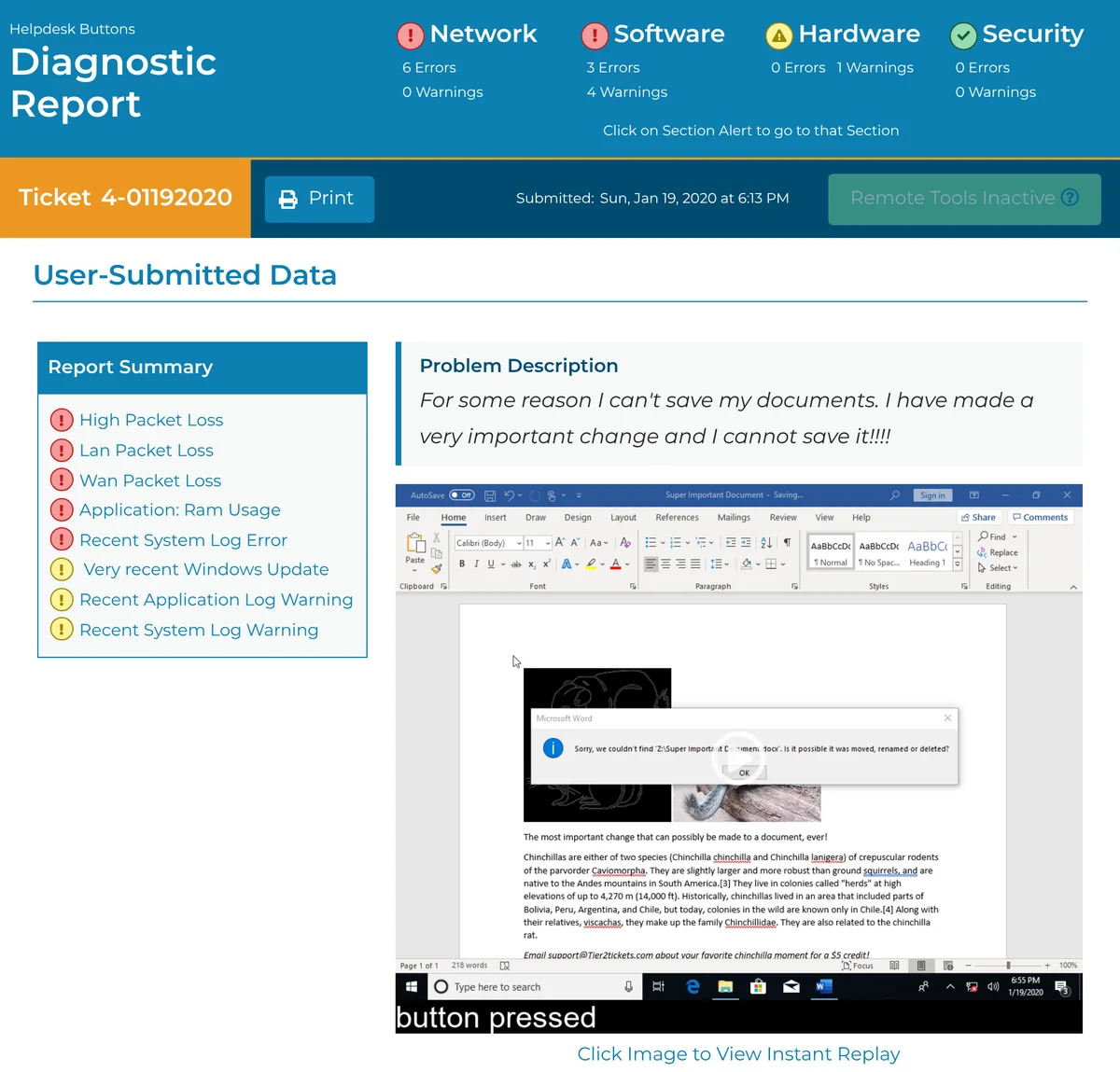
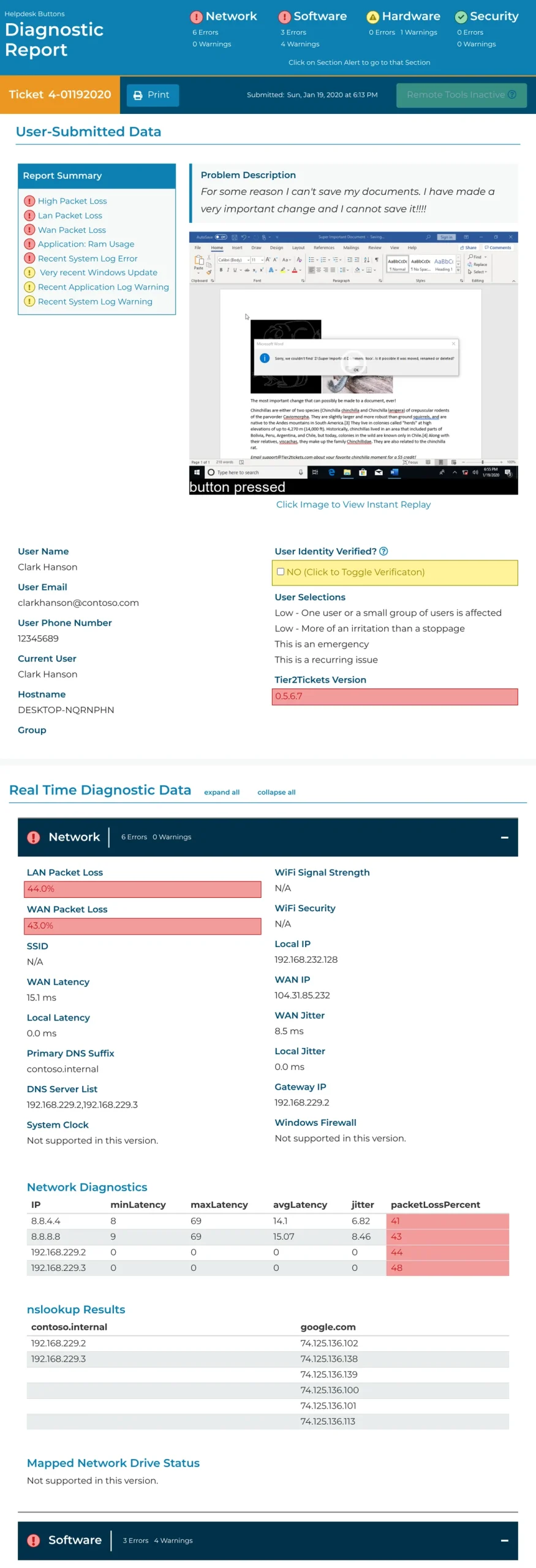
When a user says “My computer is going slow,” Tier2Tickets sends you over 70 diagnostics and a replay of their last 20 actions.
Tier2Tickets turns every end-user request into a complete ticket in your PSA, with device data, flagged trouble spots, and an instant replay of what happened. Users can submit it with a hotkey, a desktop icon, or the USB Helpdesk Button™.
Every request becomes a complete ticket in your PSA, with device data, flagged trouble spots, and a replay of what happened.
“I personally want to thank you guys, because we landed our biggest client because of you.”Kevin Kahn, Intellicomp
The free plan covers up to 25 endpoints for as long as you need it, and you won’t need a credit card. It includes every feature, and you can set it up without a sales call.
Book a 10–15 minute demo with Emilio Garcia
The demo takes 10–15 minutes, and the calendar books 30 minutes so you have time for questions. Pick a time below, and you’ll get a Zoom link by email right away.
You’re booked. Your Zoom link is in the calendar invite and in your confirmation email.
Want to look around before the call?
The free plan covers up to 25 endpoints for as long as you need it, and you won’t need a credit card.
Can’t find a time that works? Message us on Discord.
“Honestly, Tier2Tickets has become not just a want to have, it’s a need to have. We have easily cut down on our ticket diagnosis time by 50%…”
Matt Kinsey, MK Tech
Tier2Tickets works with the PSA you already use, including ConnectWise, Autotask, HaloPSA, Syncro, Kaseya BMS and SuperOps. In total, it integrates with 12+ PSAs.
Here’s what lands in your PSA.
Every ticket shows up with what your tech actually needs.
- Every ticket includes 70+ real-time device data points. The software collects system info, processes, CPU, memory, disk, hardware status and network checks when the user triggers it.
- You get an Instant Replay of the user’s last 20 actions. The annotated replay shows what the user did right before the problem, so you don’t have to ask them to reproduce it.
- Trouble spots are already flagged. Self-diagnosing reports flag common helpdesk issues and link to resources that help resolve them.
- Users can still submit a ticket when their device is offline. They scan a QR code with their phone, and the submission runs 10 network tests before you can even remote in.
- You can triage tickets before they hit your board. Dispatcher Rules route tickets based on user info, message or selections before they enter your PSA.
You can see a live example ticket or create your free account.
For MSP owners, the Helpdesk Button™ is a sales tool as well as a way to open tickets.
Show prospects your service before they sign.
Clients know they need IT, but most can’t tell what you actually do. The Helpdesk Button™ is a branded, physical representation of your support that management and non-technical staff understand right away. Use it in sales meetings and onboarding, or swap it in for the swag you already buy. Prefer no hardware? The same software runs from a hotkey or desktop icon.
“I personally want to thank you guys, because we landed our biggest client because of you. We actually went head-to-head with three or four MSPs and the clients were so impressed with the buttons, that was a big part of their decision: they thought it was very forward-thinking of us to have a product like that. Customers love it and are very impressed by it.”
Kevin Kahn, Intellicomp
“Within 48 hours of my first order with Helpdesk Buttons, I secured a $6000 MRR contract. The clients loved it.”
A Michigan-based MSP
Here’s how it works.
Setup takes minutes, not a whole project.
- Deploy the agent. Push the installer with the RMM you already use.
- Connect your PSA. The HaloPSA and Autotask setup guides say it takes “as few as 15 minutes.”
- Users press a hotkey, icon, or button. They type their name and describe the issue, and they don’t need a password or an account. The full ticket lands in your PSA.
Here are common questions MSPs ask before a demo.
Do we have to buy the USB buttons?
No, the button is optional. The same software launches from a hotkey (many MSPs bind it to F1), a desktop icon or the taskbar. Buttons are a separate, one-time purchase if you want them for sales or onboarding.
Does it work with our PSA?
Tier2Tickets has API integrations with 12+ PSAs and ticketing systems, including ConnectWise, Autotask, HaloPSA, Syncro, Kaseya BMS, and SuperOps. It also works alongside portals like DeskDirector.
What about security and client data?
The software is encrypted end-to-end, supports MFA via TOTP, and includes auditing and reporting. A self-hosting option lets you keep diagnostic data in your own storage.
Won’t users mash the button for every little thing?
You stay in control of what reaches your board. After a user submits a ticket, Tier2Tickets won’t let them submit another one right away, so a frustrated user can’t flood your board with duplicate tickets about the same problem. Dispatcher Rules triage every request before it enters your PSA, routing it based on user info, message, or selections.
Can we try it without a sales call?
Yes, you can. The free plan includes every feature and covers up to 25 endpoints for as long as you need it, and you won’t need a credit card. You can create your free account now, or pick a demo time if you’d like a walkthrough first.
The free plan covers up to 25 endpoints, and you won’t need a credit card. Beyond that, it’s less than a dollar per endpoint per month. You can see full pricing on our pricing page.
Here’s what MSPs say about Tier2Tickets.
“It literally makes our technicians smarter!… This client is 2.5 hours from us. Helpdesk Buttons showed us exactly where to start and we avoided having to go onsite.”
Andrew Newberry, Reliance Technology Solutions
“We are always looking to improve our clients experience with technology. Support requests are now a push of a button and our clients could not be happier!”
Dylan Minter, Hantera
“This is easily, one of the most brilliant solutions I’ve seen. Not just in “IT” but universally! Bravo!”
Patrick Rufino, Artemis IT
Here’s what to expect on the demo.
- Emilio Garcia runs the demo over Zoom. It takes 10–15 minutes, and the 30-minute slot leaves time for your questions.
- We trigger a real ticket and show you exactly what lands in your PSA.
- We cover your setup: PSA, endpoint count, and whether buttons make sense for you.
- The software has no long contracts and no license minimums. You can start on the free plan the same day.
- An MSP team built Tier2Tickets.
“It’s nice to have a company built by an MSP for an MSP. You guys get it!”
Tony Tribuzio, Hexi-Tech
The perfect ticket, every time.
Pick a time for your demo.
Or you can create your free account. The free plan covers up to 25 endpoints for as long as you need it, and you won’t need a credit card.